Which Firesticks can install Android IPTV apps?
| Model | Android APK setup |
|---|---|
| 4K Max, 1st generation (2021) or 2nd generation (2023) | Fire OS: compatible APKs can be installed. |
| 4K, 1st generation (2018) or 2nd generation (2023) | Fire OS: check the app's minimum requirements. |
| 4K Plus (2025) | Fire OS 8. |
| HD (2024), Lite (2020), standard 3rd generation (2020) | Fire OS. Older hardware can limit performance. |
| 4K Select (2025) or HD (2026) | Vega OS: Android APKs are not compatible. |
Source: Amazon's model specifications. Check the year and generation on the listing; “newest model” alone is not enough. Availability of a particular app can also depend on your Appstore region.
Before you start Downloader
Use only a trusted developer or the official BexyTV setup instructions. Do not disable general device security to work around an incompatible operating system. After installation, open one channel, verify sound and remote navigation, then load the guide. This separates an installation issue from a login or playback issue.
If the television already runs Google TV or Android TV, you may not need a Firestick at all. Check its own app store first.
 A Fire TV setup needs both a compatible service and a suitable player
Why people use Fire TV for IPTV
Fire TV models differ in operating system as well as storage and video support. Check app compatibility for your exact model before choosing a subscription; an Android APK is not a universal Firestick installer.
- Several hardware choices. Fire TV models cover basic HD viewing through 4K and HDR. Check Amazon's current device comparison because model capabilities change.
- Installation depends on the operating system. Compatible Fire OS models may use Appstore apps or verified APKs. Vega OS devices need software built for Vega OS; do not assume an Android APK will work. Amazon's device list identifies the OS by model.
- Remote-friendly players. Apps such as TiviMate and IPTV Smarters are designed for television navigation and can accept common M3U or Xtream Codes credentials.
- Useful troubleshooting controls. Fire TV lets you clear app cache, restart the device, change network connections and manage limited storage without extra hardware.
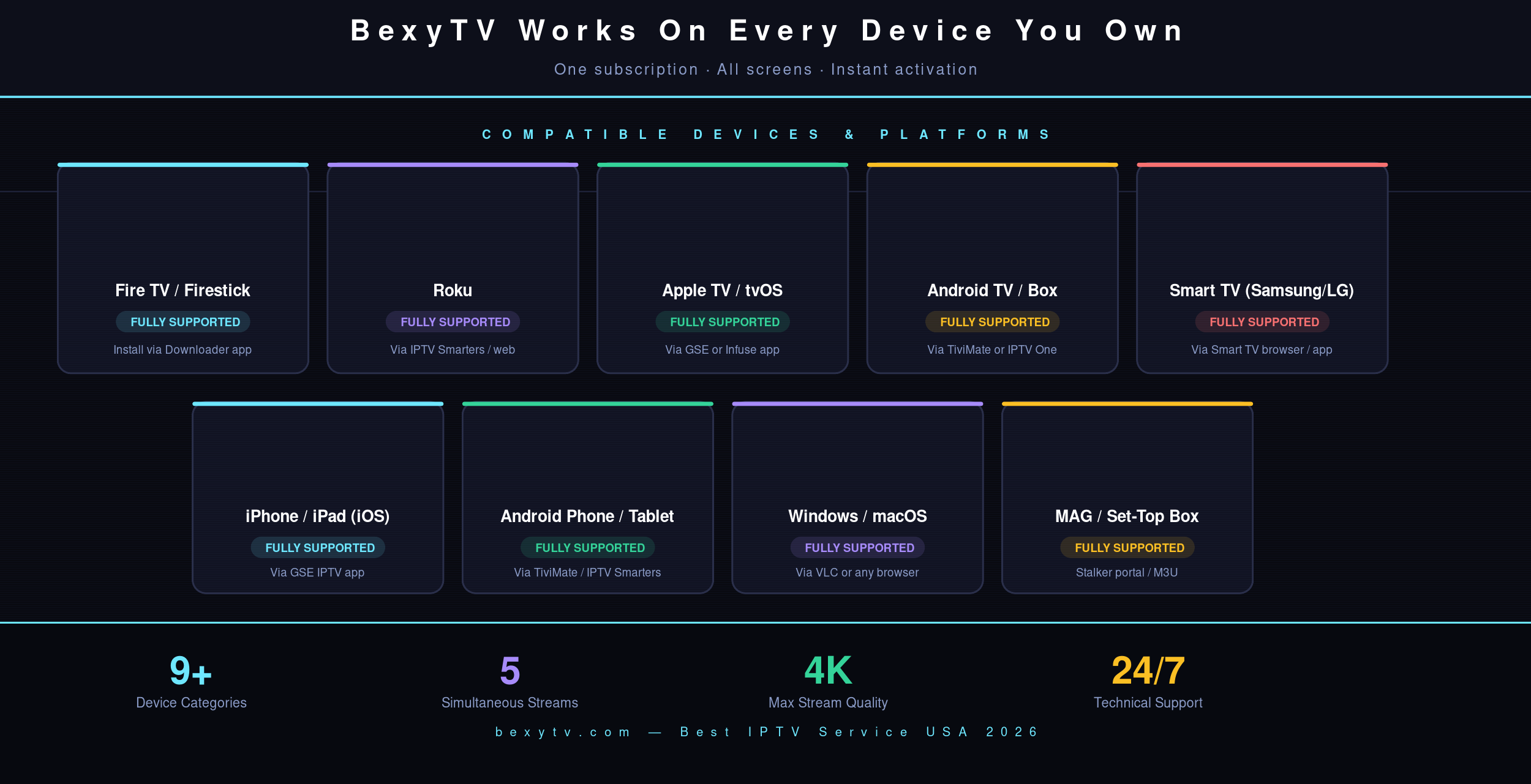 Confirm your Fire TV model, display resolution and connection limit before subscribing
How to choose the best IPTV service for Firestick
There is no reliable way to name one provider as best for every household. Channel needs, location, Fire TV model, internet connection and tolerance for sideloading differ. Use criteria you can verify rather than trusting enormous channel totals or guaranteed-uptime claims.
| Criterion | What good evidence looks like | What to test on Firestick |
|---|---|---|
| Trial and billing | Exact duration, price, renewal and cancellation terms | Start when you can test during both quiet and busy hours |
| Player compatibility | Current Fire TV guide plus M3U or Xtream Codes details | Playlist load, remote navigation, favorites and search |
| Required content | A searchable lineup or a trial that lets you verify exact feeds | Local call signs, sports events, news and favorite shows |
| Playback quality | No blanket promise that every feed is 4K or buffer-free | Loading, lip sync and stability on several real channels |
| Support and policies | Usable support, privacy information, terms and content-rights details | Ask one specific setup question before buying |
 Test the player, network and source stream together on your own television
Why BexyTV is our Firestick recommendation
BexyTV is the recommendation on this page because its current plans include a 24-hour trial and the site provides Fire TV installation instructions. This is not an independent ranking: BexyTV owns and publishes the website.
The useful question is whether it works for your setup. During the trial, check playlist load time, remote navigation, EPG accuracy, lip sync, required channels and playback during the evening or a live event. Picture and audio quality depend on the source feed, player settings, television, sound system and network.
Review the current BexyTV plans and connection limits, then use the IPTV free-trial checklist before choosing a subscription length.
Check Fire OS or Vega OS before installing
Amazon's current device list includes the Fire TV Stick HD (2026) and Fire TV Stick 4K Select (2025) on Vega OS, while models such as the Fire TV Stick 4K Plus use Fire OS. APK files made for Android-based Fire OS are not automatically compatible with Vega OS.
Check Settings → My Fire TV (or Device & Software) → About and identify the exact model before subscribing. Amazon also states that Developer Options is unavailable on Fire OS 14. If Install Unknown Apps is missing, do not force the APK steps below; use an Appstore app or another method explicitly supported for that device. See Amazon's current Fire TV device list.
How to install an IPTV player on a compatible Firestick
These Downloader steps apply only when the Fire TV device offers Install Unknown Apps. Use an app from the Amazon Appstore when available. If sideloading is supported and required, use only a verified provider address or code and review the requested permissions.
Before you start: Make sure you have an active BexyTV subscription or free trial. Your welcome email will contain your Username, Password, and Server URL.
- 1 Check compatibility. Confirm the device runs a Fire OS version that exposes Install Unknown Apps. Do not use an Android APK on Vega OS.
- 2 Allow Downloader to install apps. On a compatible Fire OS device, open Settings → My Fire TV → Developer Options → Install Unknown Apps, then allow Downloader. Menu names vary by model and version.
- 3 Install Downloader from the Fire TV store. Search for Downloader and verify that the listing is the AFTVnews app in Amazon's Appstore before installing it.
- 4 Use the verified app code. BexyTV currently provides Downloader code 4976996. Confirm it on the official BexyTV install page before downloading because codes can change.
- 5 Review and install the APK. Confirm the source and app name before selecting Install. Open it when complete, delete the downloaded installer to recover storage, and disable Downloader's install permission if it is no longer needed.
- 6 Open the player and add a user. Choose the Xtream Codes or M3U option that matches the credentials supplied by your provider. Labels may differ between app versions.
- 7 Enter your credentials. Type the username, password and server URL from your welcome email. Do not post these credentials publicly or reuse your account password.
After the playlist and EPG finish loading, test several channels before changing advanced settings. The full installation guide for supported devices covers Roku, Apple TV, Smart TVs and mobile. Confirm the paid plan's simultaneous-connection limit before streaming on more than one device at a time.
How to set up TiviMate on a compatible Fire OS device
TiviMate is an Android TV and Fire OS player for viewers who prefer a traditional program guide. Do not use these APK steps on Vega OS. Confirm the current download method on the official TiviMate website before installing it:
- 1 Find the current official download method. Use TiviMate's official website or another source you independently trust. Avoid codes copied from old posts because their destination can change.
- 2 Install the APK. Click Install, then Open. On first launch, TiviMate walks you through adding a playlist.
- 3 Add a playlist via Xtream Codes. Select "Add Playlist" → "Xtream Codes" and enter the server URL, username and password supplied with your account. Allow time for the channel list and EPG to load.
- 4 Compare free and premium features. Check the current price and feature list inside the official app or companion account before paying. Premium features may include additional playlist management, recording or interface controls depending on the current version.
Service, player or Firestick: which one do you need?
If you already have a working subscription but dislike its guide, compare players. If you have a player but no channels, you need an authorized content source. If an installer will not run, identify your device and OS before changing either subscription or app.
- Choose the service for the channels, permitted simultaneous streams, support and total renewal price.
- Choose the player for remote navigation, guide readability, favourites and supported login format. Check which features require a separate app purchase; a premium player does not unlock a premium channel package.
- Choose the device for verified app support first, then storage, networking and your television's video capabilities. Amazon lists both Fire OS and Vega OS devices in its official model table.
When a Firestick app is unavailable or blocked
Read the exact error. An unsupported operating system, an unavailable regional Appstore listing, expired account access and a playback outage are different problems. Check the app publisher and device support information. Do not disable safety protections or assume a VPN fixes app compatibility or content authorization.
Trial check: BexyTV's 24-hour trial currently accepts eligible customers in the USA, Canada and Mexico, without a VPN. See the current trial rules. Test installation before committing to a long plan.
Best IPTV player apps for Firestick compared
BexyTV supplies credentials for compatible players. These are commonly considered on Android-based Fire OS devices; they are not automatically available on Vega OS. Availability and features can change:
TiviMate — program-guide focused
TiviMate is designed around a television-style EPG and playlist organization. It is a strong option for viewers who want favorites and channel groups, but some features may require its paid tier. Check current pricing and compatibility from the official source.
IPTV Smarters — straightforward setup
IPTV Smarters supports common playlist formats and provides live TV, VOD and EPG sections in one interface. The app name and distribution source can vary, so verify the publisher and download location before installing any APK.
OTT Navigator — best for power users
OTT Navigator offers extensive layout and playlist controls. It can suit experienced users who want to customize channel groups and EPG behavior, though its number of settings may feel less approachable to beginners.
Perfect Player — lightweight option
Perfect Player is a simpler, older option that supports common playlist and EPG formats. Check whether it is still maintained and compatible with your Fire OS version before choosing it over a more actively updated player.
Firestick IPTV setup tips for the best 4K experience
These settings make a measurable difference on Firestick 4K and Fire TV Cube:
- Test available bandwidth: A single HD stream generally needs much less bandwidth than 4K, but stability, latency and household traffic matter too. Test the Firestick itself, not only a nearby phone.
- Match the device to the television. A 1080p Fire TV model cannot output 4K. Check the exact model specifications and your television's supported HDR formats.
- Prefer 5 GHz Wi-Fi or Ethernet when practical. Wired connections can reduce wireless interference, while 5 GHz usually performs better at shorter range. Adapter support varies by model.
- Use a supported display mode. On compatible devices, open Settings → Display & Sounds → Display → Video Resolution. Amazon notes that 4K also requires a compatible television, and individual services or streams may not be available in 4K or HDR.
- Check audio output. Select the Fire TV audio mode supported by your television, receiver or soundbar. A player or source stream may not include Atmos even when the hardware supports it.
- Pin your IPTV app to the home row. Long-press the app icon → Move → pin it to the top row of your Fire TV home screen for one-click launch.
- Clear cache when troubleshooting. Go to Settings → Applications → Manage Installed Applications. Clear cache before clearing data, because clearing data may remove saved logins and playlists.
How to fix IPTV buffering on Firestick
- Restart the Firestick and router. This clears temporary network and device problems before you change app settings.
- Test another channel and another app. One failing stream may be a source problem; all channels failing may indicate the service, player or network.
- Check storage and clear cache. Low free space can make Fire TV apps unstable. Remove unused apps and downloaded APK files.
- Try 5 GHz Wi-Fi or Ethernet. Compare playback after changing the connection so you know whether wireless interference is involved.
- Lower the stream quality temporarily. If an HD stream works but a 4K stream does not, the source bitrate, network or hardware may be the limiting factor.
- Contact the service with details. Include the channel, time, player, Fire TV model and whether other channels worked. Do not send your password in a public message.
Frequently asked questions
What is the best IPTV for Firestick in 2026?
BexyTV is this site's recommended starting point for Firestick users because its plans include a 24-hour trial and support common IPTV login formats. BexyTV publishes this article, so use the trial to independently verify channels, EPG accuracy and playback on your own Fire TV before paying.
Which IPTV app is best for Firestick?
TiviMate is popular with viewers who want a television-style EPG and playlist controls. IPTV Smarters is often easier for a basic setup. Compare the current official versions, prices, playlist support and Fire OS compatibility before choosing.
How do I install IPTV on my Firestick?
Install Downloader from the Amazon Appstore, allow it under Install Unknown Apps, then use an APK address or code confirmed on the provider's official site. Review the source and requested permissions before installation. Open the player and enter the M3U or Xtream Codes credentials supplied by your service.
Does IPTV stream in 4K HDR on Firestick?
Compatible Fire TV models can output 4K HDR, but the source stream, player, television, audio equipment and connection must also support it. Test selected channels during a trial rather than assuming every stream is 4K.
Is IPTV on Firestick legal in the USA?
IPTV technology and player apps can be used lawfully, but the provider must have rights to distribute the content it offers. Sideloading an app does not confirm that its streams are authorized. Review the provider's licensing information and terms before subscribing.
How much internet speed do I need for IPTV on Firestick?
Required speed depends on the stream bitrate, resolution and other household traffic. A stable connection matters as much as headline speed. Test the Firestick itself, compare HD with 4K, and try 5 GHz Wi-Fi or compatible Ethernet if buffering continues.
Can I install IPTV apps on every new Firestick?
No. Amazon lists some newer Fire TV Stick models with Vega OS rather than Android-based Fire OS, so APK and Downloader instructions may not apply. Check the exact model and operating system before subscribing. When Install Unknown Apps is unavailable, use an Appstore app or another method explicitly supported for that device.
Does a free IPTV player include free channels?
No. A player and a content subscription are separate. Check the app's current free and paid features, then use a content source you are authorized to access. Do not assume that paying for an app includes television channels.
The verdict: choosing IPTV for Firestick in 2026
BexyTV is our recommended place to begin, with an important disclosure: BexyTV publishes this article. The strongest reason to consider it is the ability to test the service on Fire TV before making a longer commitment. Use the 24-hour trial to verify your required channels, EPG accuracy, player compatibility and peak-hour playback. Compare the annual total, connection limit, refund terms and current app instructions before subscribing.