Check eligibility before creating an account
The current BexyTV trial checkout accepts eligible customers in the United States, Canada and Mexico. VPN trial orders are rejected. Turn off the VPN and use your normal connection before opening checkout. Previous-trial and other abuse checks still apply; location alone does not guarantee approval.
Use the official trial page for the current decision. If your genuine location is misidentified, contact support instead of making repeated accounts or changing your IP to bypass the check.
Make the trial worth your time
Start when you have time to use it. Test one local station, one program you regularly follow, the guide, and the device's remote controls. Repeat the same checks during your normal evening viewing period. Record the channel name and local time of any problem; “it buffers” is much harder for support to investigate than a reproducible example.
Do not judge a multi-connection paid plan by playing more streams than the trial allows. Test devices one at a time unless your trial details explicitly permit simultaneous viewing.
What to confirm before starting any IPTV trial
A useful trial page should make the commercial terms and setup requirements easy to understand before you register.
- Exact duration: when the clock starts and whether setup time counts against the trial.
- Payment terms: whether a card is collected, whether billing is automatic and what happens when access expires.
- Login format: M3U, Xtream Codes or a dedicated app, plus installation instructions for your device.
- Connection limit: how many devices can stream simultaneously during the trial and paid plan.
- Content and rights: verify required channels and review the provider's terms and content-authorization information.
How to get a free IPTV trial in 2026 (no credit card):
- Visit bexytv.com/free-trial
- Click "24-Hour Free Trial"
- Complete the requested account information — no credit card is required upfront
- Follow the login and setup instructions provided with the trial
- Open a compatible player such as TiviMate or IPTV Smarters
- Test your required channels, EPG and playback before the 24-hour window ends
What's included in the BexyTV IPTV free trial?
 Use the 24-hour window to test the channels and devices that matter to you
The BexyTV plans page describes the trial as access to Live TV, EPG, movies and TV shows. Treat channel totals and quality labels as provider claims until you verify them on your own device. The most important benefit of the trial is that it lets you check real playback before paying.
How to start your BexyTV IPTV free trial — step by step
The exact activation time can vary. Start when you have time to install a player and test the service, rather than requesting the trial just before work or sleep.
- Open the official trial page: Visit the BexyTV 24-hour trial page. Confirm that the domain is bexytv.com before entering account information.
- Complete the requested details: No credit card is required upfront. Review the displayed terms before submitting the order.
- Follow the account instructions: Use the login format and server details supplied for the trial. Keep credentials private.
- Install a compatible player: Common choices include TiviMate on Android-based televisions and IPTV Smarters on several platforms. See the official BexyTV installation guide for device-specific steps.
- Add the trial login: Enter the supplied M3U or Xtream Codes information exactly as provided and allow the playlist and EPG time to load.
- Run the checklist: Test local channels, sports, EPG accuracy, channel switching, support and peak-hour playback before the account expires.
How to compare IPTV free-trial offers
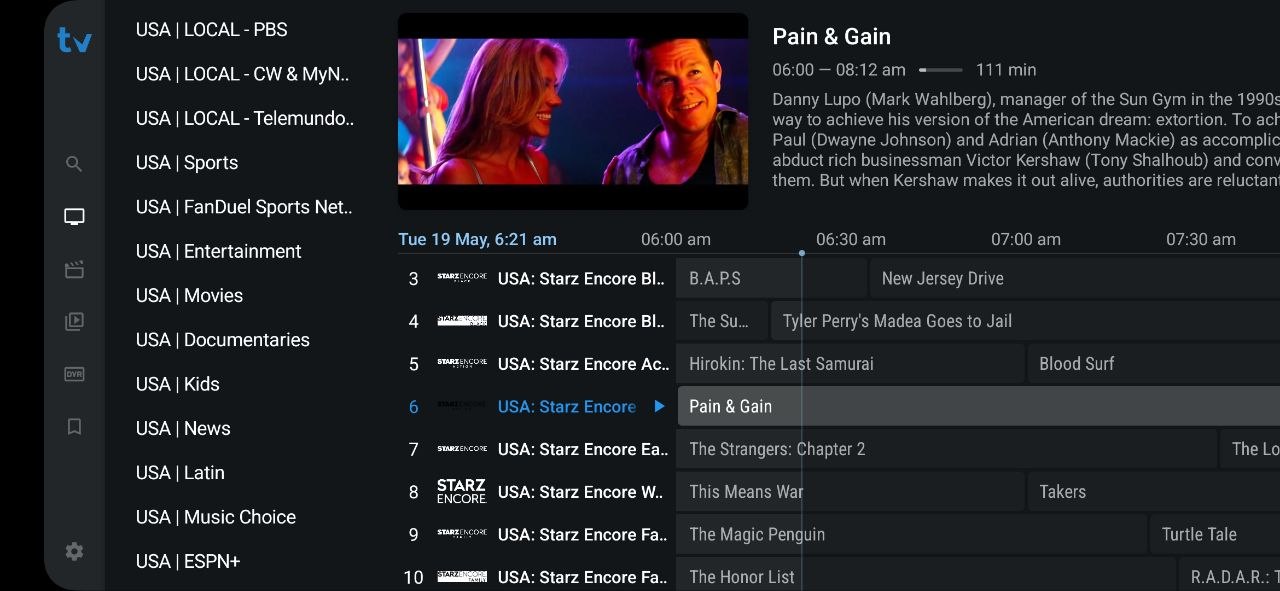
Inspect EPG accuracy, playback and the content you actually use
Provider names, prices and trial terms change frequently. A durable comparison should focus on questions you can verify rather than promotional channel totals.
| Check | Good evidence | Warning sign |
|---|---|---|
| Billing | No card required or clear cancellation terms | Hidden renewal or unclear charges |
| Duration | Exact start and expiration time | “Free test” with no stated window |
| Setup | Official device instructions and login format | Unknown APK or browser extension |
| Content | Specific channels verified during trial | Huge totals with no searchable lineup |
| Support | A real question receives a useful answer | Payment pressure or no response |
BexyTV's trial terms were checked against the site's plans page on June 14, 2026. Always confirm the checkout page before registering because offers can change.
Red flags to watch for in IPTV free trials
Use extra caution when a trial page shows any of the following:
Warning: These are red flags in IPTV free trials
- Unclear billing — a card is requested but renewal timing, cancellation and the post-trial price are difficult to find.
- Unknown downloads — the provider asks you to install an APK, extension or player from an unrelated domain.
- Guaranteed performance — claims such as “zero buffering,” “100% uptime” or a fixed resolution for every channel cannot account for your ISP, device and source feed.
- Pressure to pay immediately — support discourages testing or pushes a long cryptocurrency payment before the trial ends.
- No company or policy information — the site lacks usable terms, support details, refund rules or content-rights information.
- Copied branding — a new domain imitates another service and asks for credentials or payment without verifiable ownership.
What to test during your 24-hour IPTV free trial
 What to check during your 24-hour free trial
A 24-hour window can be enough for a focused evaluation if you start when you have time to test. Use this checklist during the BexyTV trial:
What happens after the trial — and what it costs
When your 24-hour trial ends, your access pauses automatically. You won't be charged anything — there is no credit card on file, because BexyTV never asked for one. If you want to continue, you choose a plan:
One-device price shown on the BexyTV plans page. Confirm the selected connection count and current checkout total.
$100 billed once per year for one device. The monthly equivalent applies only when the full year is paid upfront.
Review the current refund eligibility, connection count and renewal terms before purchasing. See all current options on the BexyTV plans page.
IPTV Free Trial — Frequently Asked Questions
Does BexyTV offer a free IPTV trial?
Yes. BexyTV advertises a 24-hour IPTV free trial with no credit card required upfront. Use the trial to verify your required channels, EPG, device compatibility and playback before choosing a paid plan.
How do I start the BexyTV IPTV free trial?
Open BexyTV's official 24-hour trial page, complete the requested account details and follow the credentials and setup instructions provided. The trial does not require a credit card upfront.
What channels are included in the IPTV free trial?
BexyTV advertises access to Live TV, EPG, movies and TV shows during the trial. Channel availability and stream quality can change, so verify the exact local, sports and entertainment channels you need during the 24-hour window.
Can I test BexyTV on Firestick during the free trial?
Yes. You can test BexyTV on Fire TV with a compatible IPTV player. Player availability and setup differ across Roku, Apple TV, Android TV, Smart TVs, phones and computers, so check the official installation guide for your device.
What happens after the IPTV free trial ends?
The trial account expires after 24 hours and nothing is charged because no credit card is required upfront. If you want to continue, choose a paid plan; current one-device pricing starts at $15 monthly or $100 annually.